


365Scores: Live Sports Scores
4.529.95K Reviews
App Specs
- Version
- 14.8.9
- Updated On
- License
- Free
- Downloads
- 50,000,000+
- Developer
- 365Scores LTD
- Categories
- Sports
- Platform
- Android, iOS
Screenshots

 Analysis by AppCompare
I’ve found that sports apps earn trust less through bold promises than through the small choices they leave in my hands: which teams I follow, which alerts reach me, and how much detail I want in a quick check-in. 365Scores: Live Scores & News is built around that kind of ongoing attention. It brings scores, coverage, and team information together, but it works best when I take a moment to shape what I see instead of treating every notification as essential.
What trust looks like in a live-score app
Sports results are time-sensitive, so I judge a score app by whether it helps me follow the competitions I care about without turning every match into a distraction. 365Scores is a free sports app from 365Scores LTD, with an average rating of 4.5 from around 2.2 million ratings and over 50 million installs. Those figures suggest a broad audience, though popularity alone can’t tell me whether its presentation suits my habits. I’d still start by choosing a small set of teams and competitions and seeing whether the feed feels useful.
It is rated for everyone and has been available since 2012. The current version is 14.7.8, and it supports Android 7.0 and later. That gives prospective users a practical compatibility check before they install it. The app also offers in-app purchases, so I would look over the choices shown on my device before buying anything; the free entry point is enough to begin exploring the core experience.
Make the alerts work for you
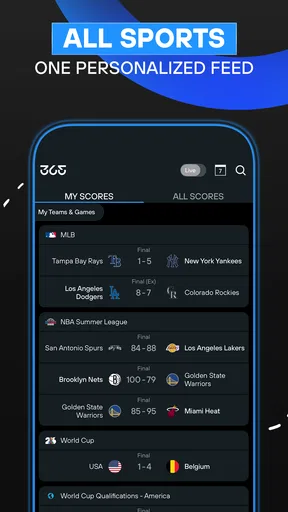
The most useful control is deciding which teams, leagues, and players deserve a place in your personal sports feed. I’d avoid following everything on the first day. Start with the teams you genuinely check, then add a competition or player only when you notice a real gap. This keeps the home experience more legible and gives you a clearer sense of whether its coverage matches your interests.
Notifications need the same restraint. A close match can generate a stream of events, and not every fan wants a phone buzz for each one. Choosing only the kinds of updates you care about—such as a goal or the final score—can make the app more useful during work, travel, or family time. If a busy match still produces too many interruptions, narrow the alerts further rather than abandoning the app altogether.
Use the detail when it answers a question
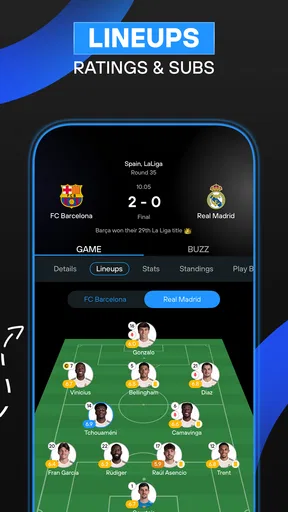
Live scores are only the starting point. Match previews, recaps, player statistics, standings, and head-to-head team comparisons help me move from “What happened?” to “How does this result fit into the competition?” That extra context is valuable when I’m following a league casually or checking a fixture before it starts. For a quick glance, though, the score itself may be all I need; digging through stats for every match can make a simple check take longer than it should.
There is also a video area for highlights and key moments, alongside sports news collected from different outlets. I see that as a convenient way to catch up when I missed a game, not necessarily a substitute for watching a full match or reading a particular reporter’s complete coverage. When an article or highlight matters to me, I’d use the app to find it and then decide whether I want more detail elsewhere.
Worth Reading Before You Choose

Baby Panda World Brings Quick Play to Modern Phones, but Its Game Library Feels Busy

ESPN’s Live Game View Makes Following Close Games Easier

QuizzLand Review: A Good Fit for Short Trivia Breaks, Not Every Player

Basketball Stars: Multiplayer Is Fast, but Can It Recover When Matches Go Wrong?

WEBTOON Turns Phone Updates Into a Better Reading Routine

Link to Windows Runs on Shared Habits, Not Social Feeds
Keep social sharing deliberate
Sharing a score can be a fun way to keep up friendly rivalry, especially when friends support different teams. It is also optional: I can use the app as a personal tracker rather than making every result a social post. I’d treat sharing as a deliberate choice, particularly when a phone is used around colleagues or family who may not care about live sports updates.
More generally, I prefer to make a quick pass through the app’s visible settings and the choices presented by my device before settling into a routine. I don’t assume that a feature’s presence tells me everything about how information is handled. If privacy or notification control is a deciding factor, read the current permission prompts and in-app options carefully, and grant only what makes sense for the way you plan to use it.
Your Personal Sports Hub
Imagine an app that lets you customize your sports world just the way you like it, and that’s exactly what 365Scores does. Whether you’re into football, basketball, tennis, or even less mainstream sports, this app has got you covered. You can select your favorite teams, leagues, and players to receive personalized content. It’s like having your own sports news channel that only shows what you want to see.
Live Scores and Real-Time Alerts
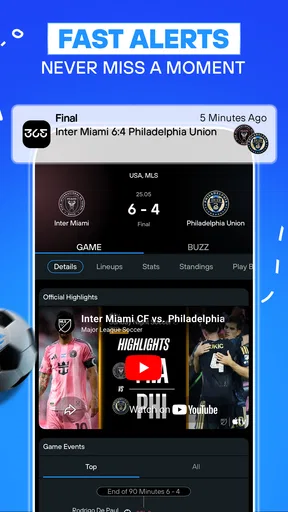
We all know the pain of missing that game-winning goal or crucial match point. With 365Scores, you’ll never miss out. The app provides live scores and updates in real-time, keeping you in the loop no matter where you are. Plus, the alerts are customizable. You can choose to get notified about goals, match events, or even just the final score. So, no more annoying buzzes for things you don't care about.
Dive into In-Depth Coverage
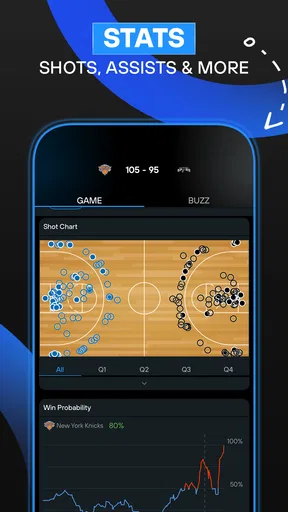
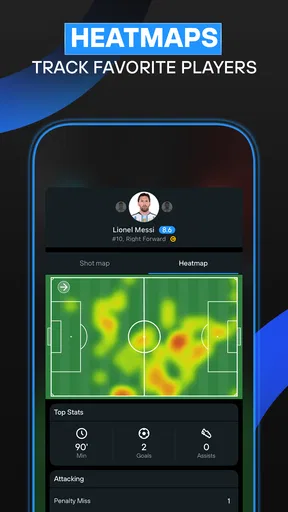
If you’re a stats junkie like me, you’ll love the detailed coverage that 365Scores offers. From match previews and recaps to player statistics and league standings, it's all just a tap away. The app’s sleek interface makes navigating through this wealth of information a breeze. You can even compare team stats head-to-head to make those all-important predictions.
News and Highlights
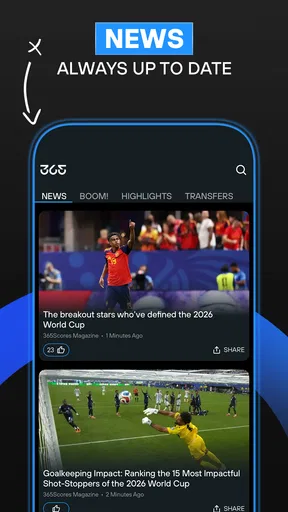
Let’s face it, sometimes you just want the highlights without sitting through the entire game. The app includes a video section where you can catch up on match highlights and key moments. And if you’re looking for news, it aggregates top stories from various sports news outlets, giving you a comprehensive view of the sports world. It’s like having a sports magazine that updates by the minute.
A Social Experience
One of the coolest features is the social aspect of 365Scores. You can share updates and scores with your friends, fostering a little healthy competition or just some good old banter. It’s also integrated with social media platforms, making it easy to brag about your team’s latest victory or commiserate their loss.
Available Anytime, Anywhere
Given that the app is available on both Android and iOS, you can carry your sports universe with you everywhere. The interface is intuitive and user-friendly, making it accessible for everyone, from tech newbies to seasoned pros. Plus, the app developers are pretty proactive with updates, ensuring a smooth experience.
Overall, 365Scores: Live Scores & News is a must-have for any sports enthusiast. It consolidates all your sports needs into one app, keeping you connected and informed. So, if you’re tired of switching between multiple apps or missing out on important sports moments, give 365Scores a shot. You won’t regret it!
A practical match-day routine
A useful way to judge the app is to try it during an ordinary day, not only while watching a major final. Suppose I’m commuting when a match starts and can’t follow a broadcast. I can check the score, then use the match page to see whether the game has changed in a meaningful way. If I only want the result, I can leave it there; if I’m curious about the wider picture, I can look at the recap or standings later. That two-step habit keeps a score check brief while still making deeper information available when I have time.
For a weekend with several fixtures, I’d use favorites as a filter rather than building a giant watchlist. Following a team gives me a direct reason to return, while adding every league can make the feed feel like another news stream to manage. A less obvious benefit of keeping the list selective is that it makes alerts easier to interpret: a notification is more likely to matter when the app is tracking only the events I actually care about.
Where it fits among sports apps
Compared with relying on a league’s own app, 365Scores is attractive when my interests span several competitions or sports. A dedicated league app may be a better choice if I want a narrowly focused experience centered on that competition. In the other direction, following scores through a general news app can be simpler if I only check major headlines occasionally, but it may not offer the same team-by-team routine of fixtures, player details, and standings in one place.
I wouldn’t treat the app as a replacement for every sports source. Aggregated news is convenient for scanning, but a reader who follows one club closely may prefer a specialist publication for deeper reporting and analysis. Likewise, highlights suit a quick catch-up, while a live broadcast is still the better fit when the atmosphere and full sequence of play matter. 365Scores is strongest as a flexible companion between those experiences: it helps me keep track, then lets me choose when to go deeper.
Small choices that prevent friction
When I set up a new sports tracker, I first decide what I want it to do: notify me of a final score, help me follow a live game, or provide a quick daily news scan. Those are different routines, and enabling every possible alert at the start can blur them together. I’d begin with the narrowest notification choices, use the app for a few days, and add another type only if I find myself repeatedly opening it to look for that information.
There’s a similar trade-off with statistics. Head-to-head comparisons and player numbers can add useful context before a match, but they are not a guarantee of what will happen. I use them as a way to frame a conversation or understand a matchup, not as a prediction engine. That distinction matters if you follow sports casually: the figures can enrich the experience, but they do not need to become homework.
Who will get the most from it
I’d recommend trying 365Scores if you follow several teams, want to keep an eye on more than one sport, or often need scores while you’re away from a television. It also suits fans who like to check a result first and then explore a recap, a table, or player information without switching immediately to separate sources. Someone who enjoys friendly score-sharing may appreciate the social side, while anyone who prefers a quiet tracker can simply focus on their own selections.
It may be the wrong fit if you want only one competition’s official coverage, dislike sports notifications altogether, or prefer long-form reporting over quick updates and aggregated stories. It can also feel busier than necessary if you follow too many teams at once. In those cases, a league-specific app, a trusted news source, or even a simple occasional web search may be a cleaner option. The useful question is not whether the app has plenty to browse, but whether its combination of live tracking and context matches how you actually follow sport.
Cost, access, and a measured verdict
The app is free to start using, with in-app purchases listed from $0.99 to $119.99 per item. I’d explore the free experience first and only consider a purchase if a specific option solves a problem for me. That is a more sensible approach than assuming every extra is necessary, especially for someone who mainly wants scores and basic match context. Its broad availability and long-running presence make it easy to try, but the best test is still whether the feed and alerts fit your own routine.
My cautious recommendation is to install it if you want one place to follow multiple teams and competitions, then spend a few minutes choosing favorites and trimming notifications. Keep sharing optional, review the choices your device and the app visibly present, and use the deeper stats only when they help answer a real question. With those habits, 365Scores can be a practical sports companion rather than another source of noise; without them, its breadth may simply give you more updates than you wanted.
Pros
- Real-time score updates for multiple sports.
- Comprehensive news coverage and updates.
- Customizable notifications for favorite teams.
- User-friendly interface and easy navigation.
- Detailed stats and analysis for matches.
Cons
- Contains ads
- which can be distracting.
- Some features require a subscription.
- Occasional delays in score updates.
- Limited coverage for less popular sports.
- Requires internet for full functionality.
FAQs for 365Scores: Live Sports Scores
What features does 365Scores offer to enhance the sports fan experience?
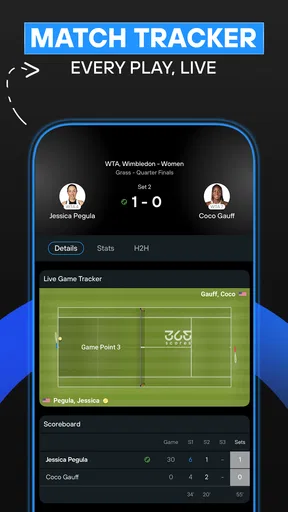
365Scores provides real-time updates on scores, news, and highlights across a variety of sports such as football, basketball, and tennis. The app allows users to personalize their experience by selecting favorite teams and leagues, ensuring they receive relevant updates. Additionally, it offers live match trackers, video highlights, and in-depth analysis.
Is 365Scores available on both Android and iOS platforms?
Yes, 365Scores is available for download on both Android and iOS devices. Users can access the app through the Google Play Store for Android or the Apple App Store for iOS, ensuring a seamless experience regardless of the device they use. The app is designed to work efficiently across different platforms.
Does 365Scores require a subscription for full access to its features?
365Scores offers a free version with access to many of its core features. However, for an ad-free experience and additional premium features such as exclusive content and advanced notifications, users can opt for a subscription. The cost and benefits of the premium version are detailed within the app.
How reliable are the live score updates in 365Scores?
365Scores is known for its timely and accurate live score updates. The app sources information from reliable sports data providers to ensure that users receive the most current updates. Whether it's a goal in a football match or a point in a tennis game, users can trust 365Scores for real-time information.
Can I customize notifications in 365Scores to focus on specific teams or sports?
Yes, 365Scores allows users to customize notifications according to their preferences. By selecting favorite teams, leagues, or sports, users can receive tailored alerts and updates. This feature ensures that fans receive only the news and scores that matter most to them, enhancing their overall experience.


